

选取文字后快速使用美式或英式英语朗读,支援语速、音量、音高调整
🔊 Text-to-Speech Selector 是一款功能强大的文字转语音Chrome 扩充功能,专为需要英语朗读的用户设计。
✨ 核心功能
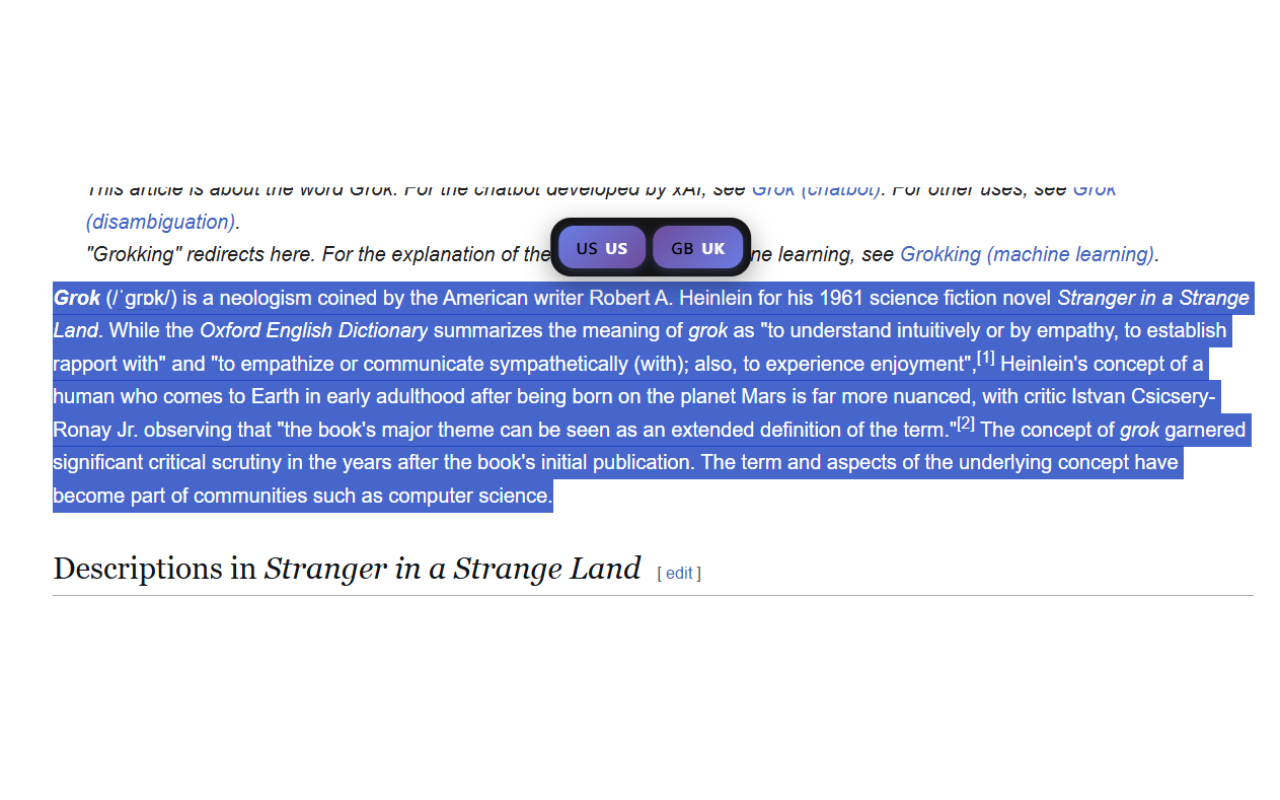
• 快速朗读:选取文字后右键即可立即朗读• 浮动工具列:选取后自动出现US/UK 按钮,无需右键操作• 双语支援:美式英语(en-US) 和英式英语(en-GB)
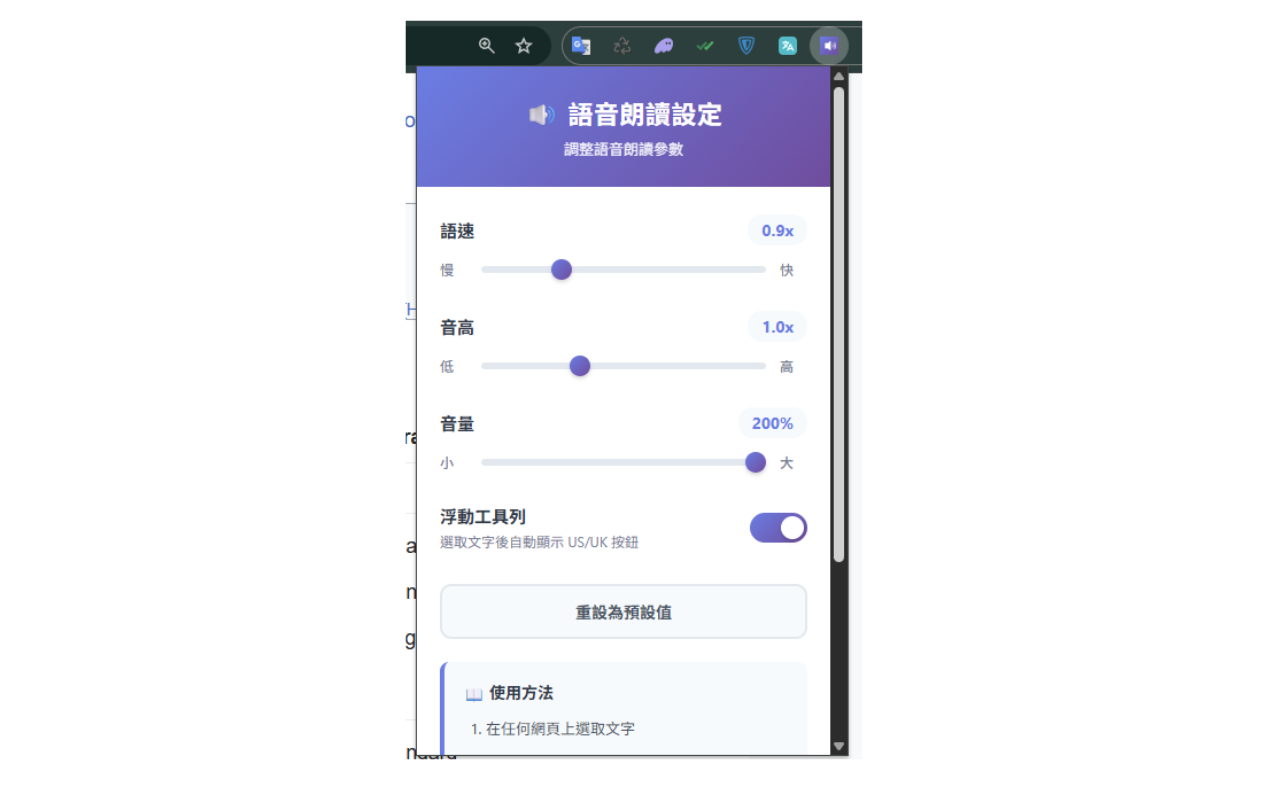
• 完整控制:朗读时可暂停、继续、取消• 自订设定:调整语速(0.5-2.0x)、音高(0.5-2.0x)、音量(50-100%)
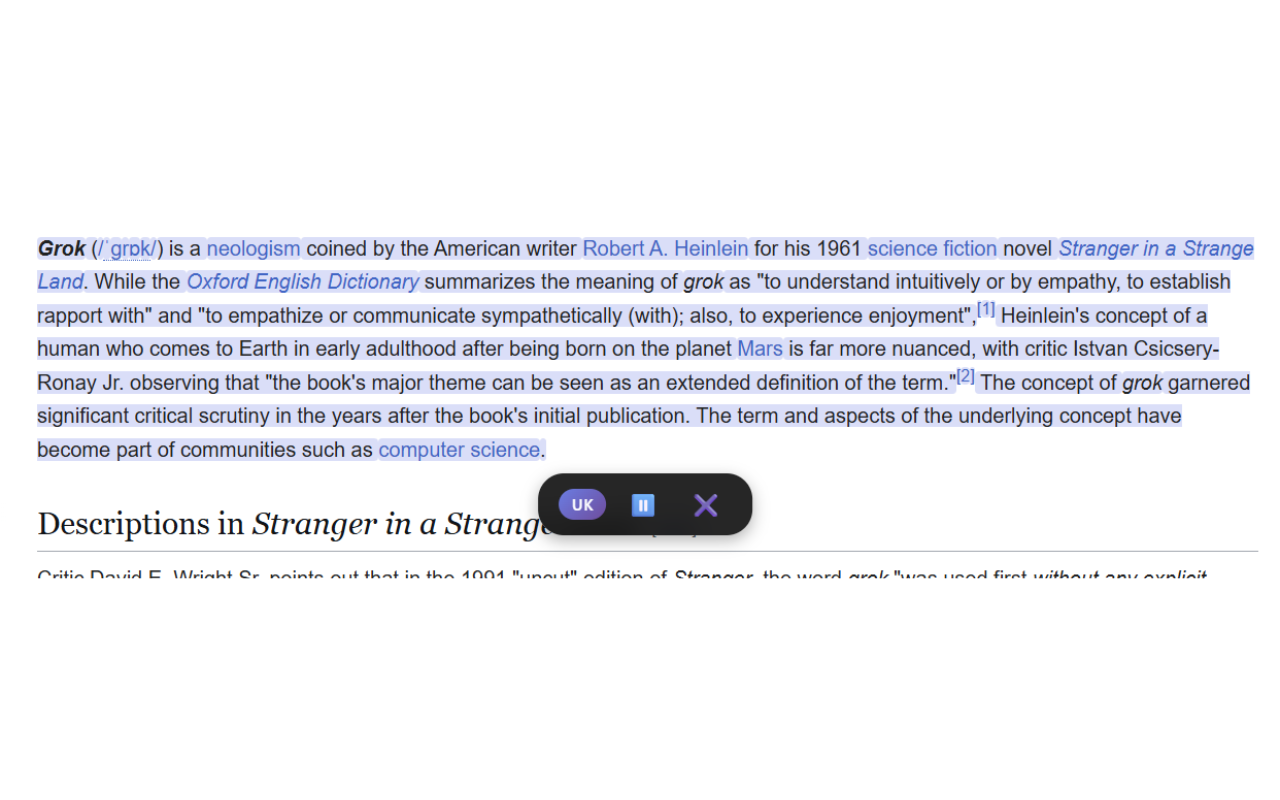
• 智慧分段:自动处理超长文字,流畅朗读不中断• 智慧定位:控制条根据页面空间自动调整位置,不挡住内容• 跨装置同步:设定自动同步到所有登入Google 帐号的装置• 淡紫色高亮:朗读时自动标示当前段落
🎯 适用场景
✓ 学习英语发音和语调✓ 检查文章的可读性和流畅度✓ 长时间阅读时的语音辅助✓ 视觉无障碍使用者的辅助工具✓ 多任务处理时的背景聆听
🚀 使用方法
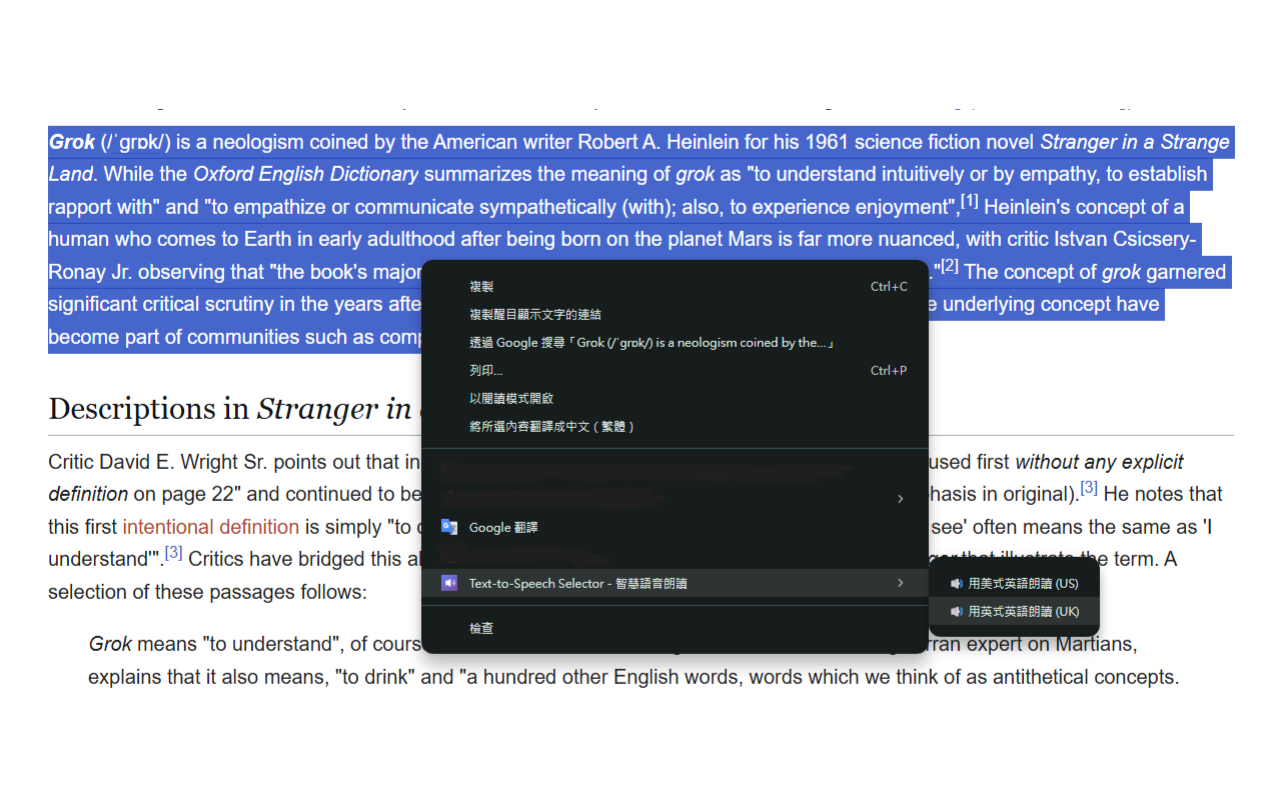
方式一:右键选单
1. 选取任何网页上的英文文字
2. 按右键选择「用美式英语朗读(US)」或「用英式英语朗读(UK)」
3. 朗读开始,控制条出现
方式二:浮动工具列(更快速!)
1. 选取文字后稍等300ms
2. 自动出现US/UK 快速按钮
3. 点击即可开始朗读
⚙️ 进阶设定
点击扩充功能图示即可调整:
• 语速:适合不同程度的学习者(0.5x 慢速- 2.0x 快速)
• 音高:调整声音高低(0.5x 低沉- 2.0x 高亢)
• 音量:控制朗读音量(50% - 100%)
• 浮动工具列:可开启或关闭自动浮现功能
🔒 隐私保护
✓ 所有处理在本机进行,不涉及伺服器传输✓ 不收集使用者选取的文字或使用数据✓ 不追踪浏览历史或行为✓ 开源透明,程式码公开可审查
💻 技术规格
• 支援平台:Chrome 88+、Edge 88+
• 使用技术:Web Speech API、Manifest V3
• 档案大小:< 1 MB
📝 权限说明
• contextMenus:提供右键选单选项• storage:储存并同步个人化设定• activeTab:在当前分页执行朗读功能• <all_urls>:在任何网站上提供右键选单和浮动工具列
❓ 常见问题
Q: 找不到英式英语语音?
A: 扩充功能会自动降级使用其他英语语音。您可以在作业系统设定中安装更多语音包。
Q: 设定没有同步?
A: 确认您已登入Chrome 帐号并开启同步功能。
Q: 可以支援其他语言吗?
A: 目前专注于英语朗读,未来版本可能新增更多语言。
🤝 开源专案
本专案采用MIT 授权,欢迎在GitHub 上提交问题或贡献程式码。
🔊 Text-to-Speech Selector is a powerful text-to-speech Chrome extension designed for users who need English audio reading functionality.
✨ Core Features
• Quick Speech: Right-click to read selected text instantly
• Floating Toolbar: Auto-appear US/UK buttons after text selection
• Dual Language: American English (en-US) and British English (en-GB)
• Full Controls: Pause, resume, and cancel during playback
• Custom Settings: Adjust rate (0.5-2.0x), pitch (0.5-2.0x), volume (50-100%)
• Smart Segmentation: Automatically handle long text smoothly
• Smart Positioning: Control bar auto-adjusts based on page space
• Cross-device Sync: Settings sync across all your Google-signed devices
• Purple Highlight: Automatically highlights current paragraph during reading
🎯 Use Cases
✓ Learning English pronunciation and intonation
✓ Checking article readability and flow
✓ Audio assistance for extended reading sessions
✓ Accessibility tool for visually impaired users
✓ Background listening during multitasking
🚀 How to Use
Method 1: Context Menu
1. Select any English text on a webpage
2. Right-click and choose "Read with US English (US)" or "Read with UK English (UK)"
3. Reading starts, control bar appears
Method 2: Floating Toolbar (Faster!)
1. Select text and wait 300ms
2. US/UK buttons appear automatically
3. Click to start reading immediately
⚙️ Advanced Settings
Click the extension icon to adjust:
• Rate: Suitable for different learning levels (0.5x slow - 2.0x fast)
• Pitch: Adjust voice pitch (0.5x low - 2.0x high)
• Volume: Control reading volume (50% - 100%)
• Floating Toolbar: Enable or disable auto-popup feature
🔒 Privacy Protection
✓ All processing happens locally, no server transmission
✓ No collection of selected text or usage data
✓ No tracking of browsing history or behavior
✓ Open source and transparent code
💻 Technical Specifications
• Supported: Chrome 88+, Edge 88+
• Technology: Web Speech API, Manifest V3
• File Size: < 1 MB
📝 Permissions Explained
• contextMenus: Provide right-click menu options
• storage: Save and sync personalized settings
• activeTab: Execute reading on current tab
• <all_urls>: Provide context menu and floating toolbar on any website
❓ FAQ
Q: Can't find British English voice?
A: The extension will automatically fallback to other English voices. You can install more voice packs in your OS settings.
Q: Settings not syncing?
A: Make sure you're signed into your Chrome account with sync enabled.
Q: Can you support other languages?
A: Currently focused on English reading, more languages may be added in future versions.
🤝 Open Source
This project is licensed under MIT. Welcome to submit issues or contribute code on GitHub.
---