

当您想要的 KSU 课程有空位时,此扩展程序会提醒您。
您的注册时间优先级低吗?
你想要的课程都填满了吗?
现在,您可以在课程开放时通过短信或电子邮件收到通知,而无需每天多次查看课程。
如何申请课程:
1. 将 Chrome 应用程序安装到浏览器。
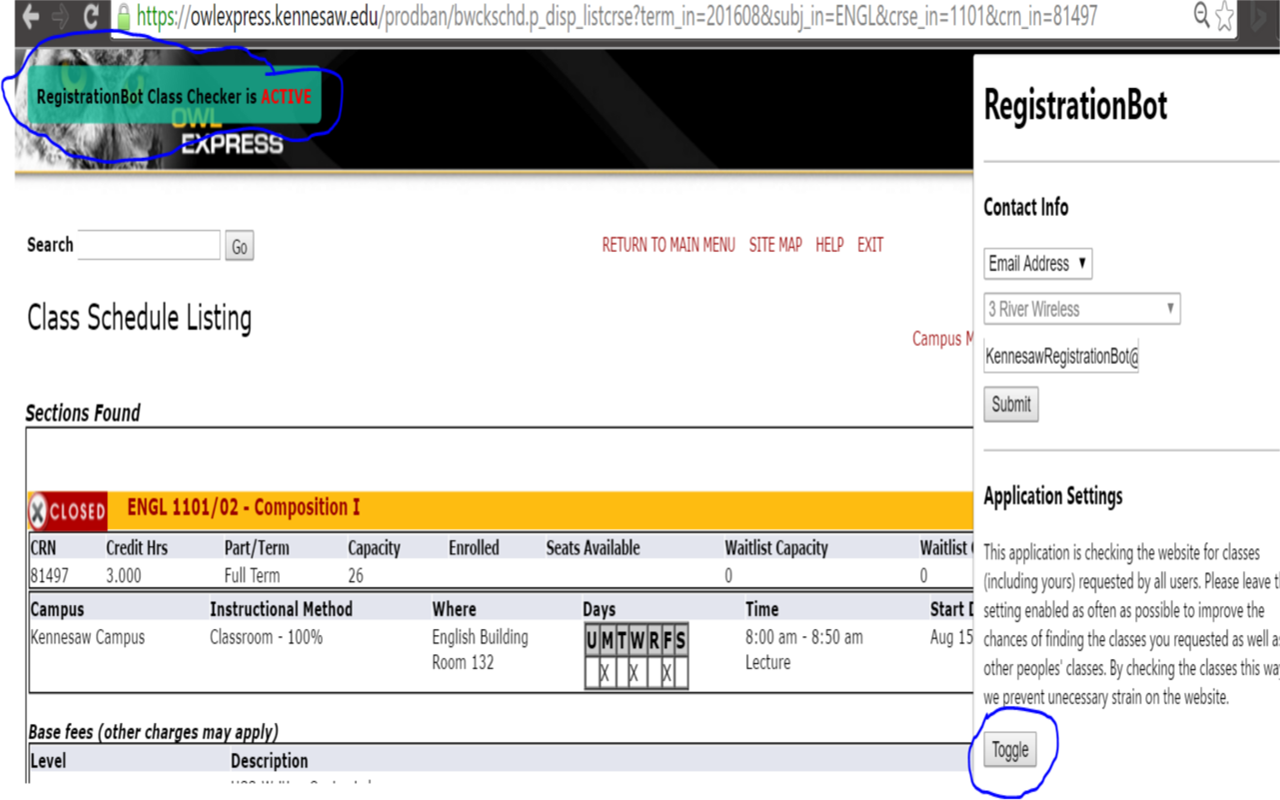
2. 按工具栏上的图标并输入您的电子邮件/电话号码
3. 在 owl expss 上,导航至所需部分。
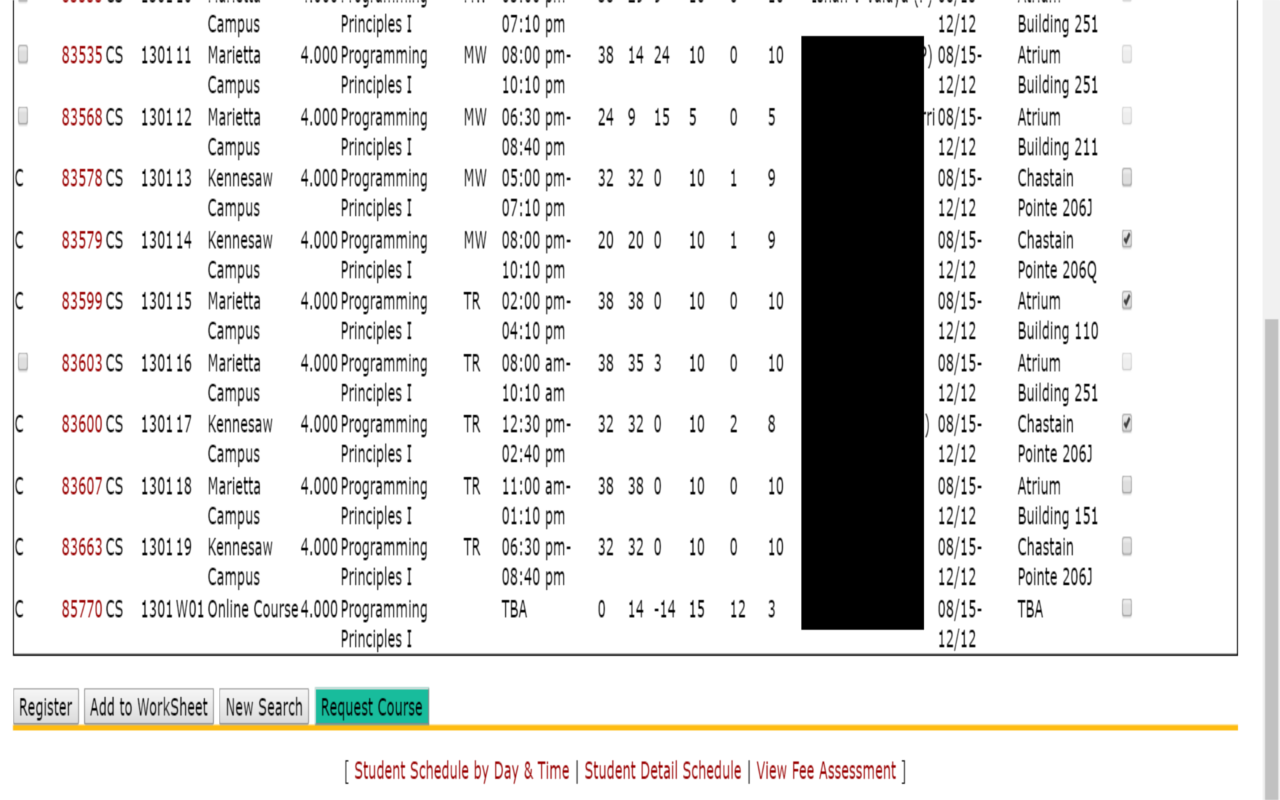
4. RegistrationBot 选择列将出现在右侧,而不是在左列中选择课程。勾选您想要的课程的复选框,然后单击底部的“请求课程”按钮。当您的课程开放时,您将收到提醒。
5. 如果您收到提醒,但在名额再次满员之前无法注册您的课程,则需要重复步骤 3 和 4。
新更新不再需要这部分
H̶o̶w̶ ̶t̶o̶ ̶C̶h̶e̶c̶k̶ ̶y̶o̶u̶r̶ ̶R̶e̶q̶u̶e̶s̶t̶e̶d̶ ̶C̶l̶a̶s̶s̶e̶s̶
̶1̶.̶ ̶O̶n̶ ̶t̶h̶e̶ ̶K̶e̶n̶n̶e̶s̶a̶w̶ ̶w̶e̶b̶s̶i̶t̶e̶(̶o̶n̶ ̶a̶n̶y̶ ̶p̶a̶g̶e̶ ̶e ̶x̶c̶e̶p̶t̶ ̶t̶h̶e̶ ̶s̶e̶c̶t̶i̶o̶n̶ ̶p̶a̶g̶e̶s̶)̶,̶c̶l̶i̶c̶k̶ ̶t̶h̶e̶ ̶R̶e̶g̶i̶s t̶r̶a̶t̶i̶o̶n̶B̶o̶t̶ ̶i̶c̶o̶n̶ ̶o̶n̶ ̶y̶o̶u̶r̶ ̶t̶o̶o̶l̶b̶a̶r̶ ̶a̶n̶d̶ ̶h̶i̶t̶ ̶t̶h ̶e̶ ̶t̶o̶g̶g̶l̶e̶ ̶b̶u̶t̶t̶o̶n̶.̶
̶2̶.̶ ̶I̶n̶ ̶2̶ ̶m̶i̶n̶u̶t̶e̶s̶ ̶o̶r̶ ̶l̶e̶s̶s̶ ̶y̶o̶u̶ ̶s̶h̶o̶u̶l̶d̶ ̶s̶e̶e̶ ̶a̶ ̶s̶t̶a̶t̶u̶s̶ ̶b̶a̶r̶ ̶a̶t̶ ̶t̶h̶e̶ ̶t̶o̶p̶ ̶o̶f̶ ̶t̶h̶e̶ ̶s̶c̶r̶e̶e̶n̶ ̶s̶a̶y̶i̶n g̶t̶h̶a̶t̶̶t̶h̶e̶̶c̶l̶a̶s̶s̶c̶h̶e̶c̶k̶e̶r̶̶i̶s̶̶a̶c̶t̶i̶v̶e̶.̶̶I̶f̶̶i̶t̶ ̶s̶a̶y̶s̶ ̶i̶n̶a̶c̶t̶i̶v̶e̶,̶ ̶r̶e̶p̶e̶a̶t̶ ̶s̶t̶e̶p̶ ̶1̶.̶
̶3̶.̶ ̶T̶h̶e̶ ̶c̶l̶a̶s̶s̶ ̶c̶h̶e̶c̶k̶e̶r̶ ̶w̶i̶l̶l̶ ̶c̶h̶e̶c̶k̶ ̶y̶o̶u̶r̶ ̶c̶l̶a̶s ̶s̶ ̶r̶e̶p̶e̶a̶t̶e̶d̶l̶y̶ ̶a̶s̶ ̶l̶o̶n̶g̶ ̶a̶s̶ ̶y̶o̶u̶r̶ ̶c̶o̶m̶p̶u̶t̶e̶r̶ ̶i̶s̶ o̶n̶,̶̶n̶o̶t̶̶s̶l̶e̶e̶p̶i̶n̶g̶,̶̶a̶n̶d̶̶t̶h̶e̶̶b̶r̶o̶w̶s̶e̶r̶̶i̶s̶̶o̶p̶e̶n̶。 ̶ ̶Y̶o̶u̶ ̶w̶i̶l̶l̶ ̶r̶e̶c̶e̶i̶v̶e̶ ̶a̶ ̶t̶e̶x̶t̶ ̶m̶e̶s̶s̶a̶g̶e̶ ̶w̶h̶e̶n̶ ̶i̶t̶i ̶s̶̶o̶p̶e̶n̶̶o̶r̶̶t̶h̶e̶r̶e̶i̶s̶̶r̶o̶o̶m̶̶o̶n̶̶t̶h̶e̶̶w̶a̶i̶t̶̶l̶i̶s̶t̶。 ̶
*专为在 https://owlexpss.kennesaw.edu/ 注册的 KSU 学生而设计